
US Technology News
Microsoft 365 Outage: Is Outlook, Teams and Copilot Back Up? Status, Cause and What to Do

The outage began Thursday, Nov 12, 2026. Microsoft said a problem from an earlier network-capacity upgrade caused it and reported broad recovery on Nov 13. Full resolution has not been confirmed.
Short answer: Microsoft reported broad recovery and stability on the evening of Thursday–Friday, November 12–13, 2026, after an outage that hit Outlook, Exchange Online, Teams and Copilot worldwide. Microsoft said the cause was a problem introduced during an earlier network-capacity upgrade that a later network change exposed — not a cyberattack. We have not seen an official "fully resolved" notice, so if things still look wrong for you, check the live status page before troubleshooting.
This article explains what happened. It is not a live status feed. For the current state, use Microsoft's own status page linked below.
What happened
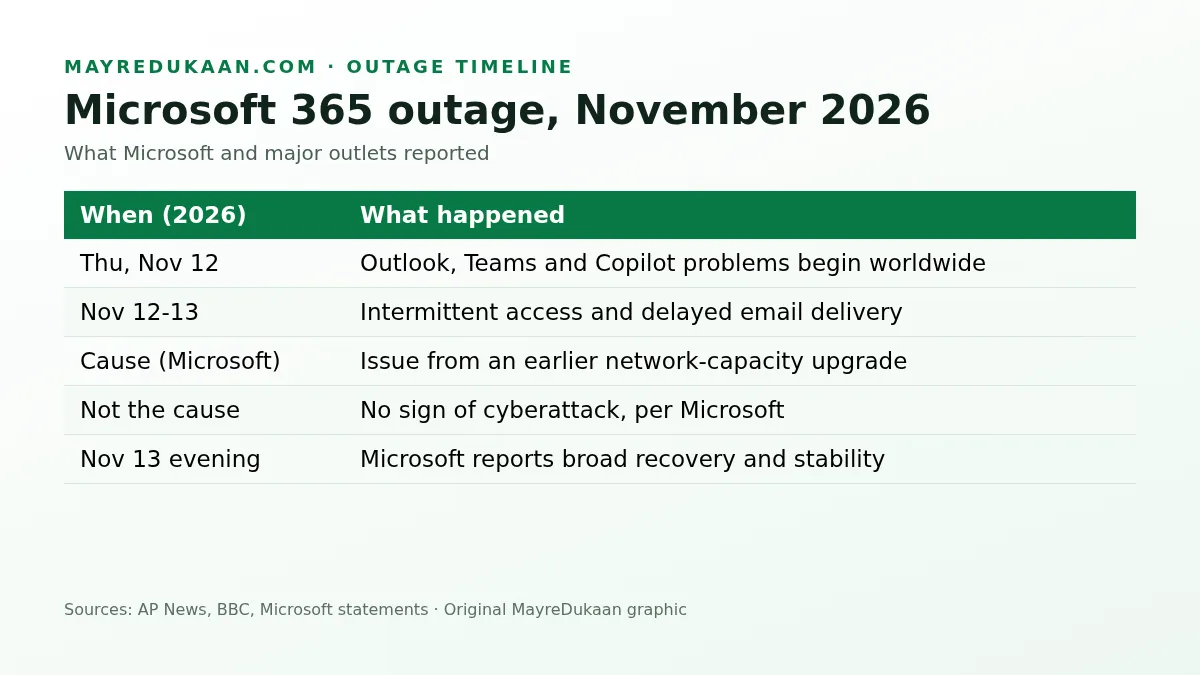
| When (2026) | What was reported |
|---|---|
| Thu, Nov 12 | Users worldwide report Outlook, Teams and Copilot problems |
| Nov 12–13 | AP reports intermittent access and delayed email delivery could continue |
| Cause | Microsoft: an issue from an earlier network-capacity upgrade, exposed by a later change |
| Nov 13, evening | Microsoft reports broad recovery and stability |
Which services were affected
- Outlook / Exchange Online — sign-in failures, empty inboxes and delayed mail
- Microsoft Teams — chats, calls and meetings failing to load
- Microsoft 365 Copilot — not responding or erroring
Was it a hack?
No. Microsoft said the cause was a network change, and there was no indication of malicious activity.
How to check Microsoft 365 status yourself
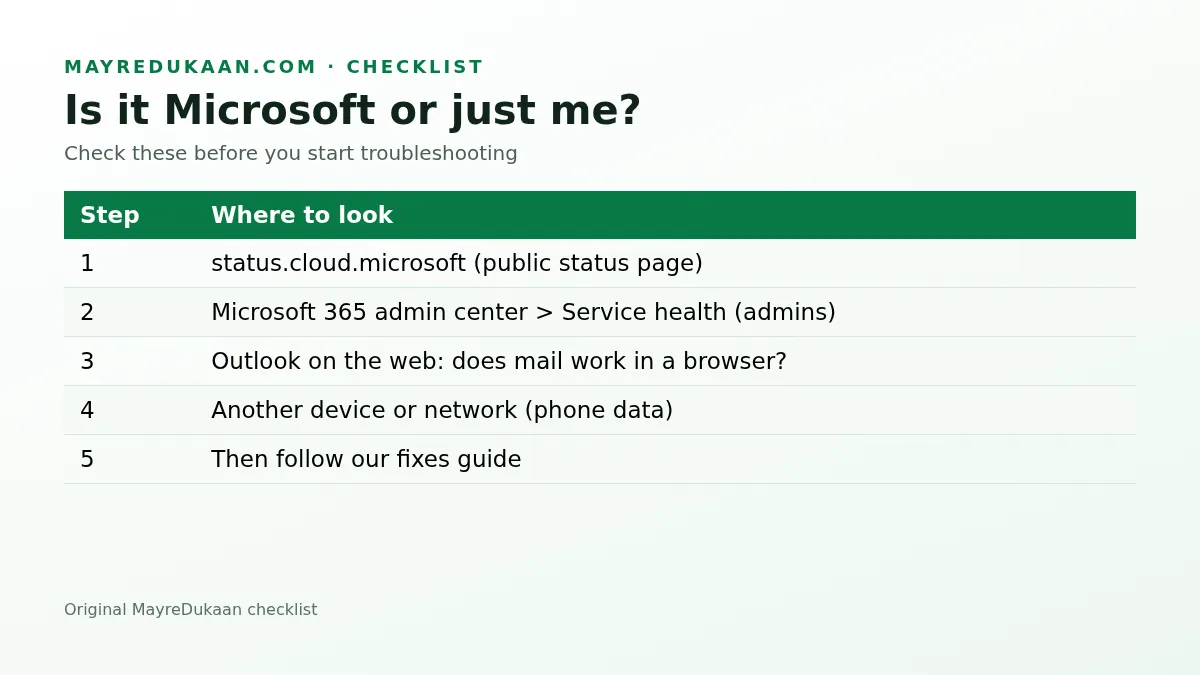
- Public status page: open status.cloud.microsoft. It shows major incidents for everyone.
- Service health (admins): in the Microsoft 365 admin center, go to *Health > Service health*. This shows incidents affecting your organization, often in more detail than the public page.
- Try Outlook on the web. If mail works in a browser but not in the desktop app, the problem is probably on your computer.
- Try another network or device — your phone on mobile data is a quick test.
- If Microsoft shows no incident, follow our Outlook and Teams fixes guide.
Delayed emails: will they arrive?
During mail-delivery incidents, messages are usually queued and delivered later rather than lost. Before you resend an important email, check your Sent Items and ask the recipient — resending too quickly can create duplicates.
How to avoid losing work during an outage
- Save documents locally (*File > Save a copy*) if OneDrive sync is failing.
- Copy long Teams messages or emails into a text file before pressing Send.
- Keep a phone number for key contacts so you are not dependent on Teams.
- For deadlines, tell people another way that email is delayed.
Key facts
- Start: Thursday, November 12, 2026
- Affected: Outlook/Exchange Online, Teams, Copilot
- Cause (Microsoft): network-capacity upgrade issue; not a cyberattack
- Status Nov 13: broad recovery; full resolution not confirmed by us
Frequently asked questions
Is Outlook down right now?
Check status.cloud.microsoft for the live answer. Microsoft reported broad recovery on Nov 13, 2026.
What caused the Microsoft 365 outage?
Microsoft said a problem introduced during an earlier network-capacity upgrade, exposed by a later network change.
Was the Microsoft outage a cyberattack?
No. Microsoft said there was no indication of malicious activity.
Will my delayed emails be delivered?
Usually yes; queued mail is delivered once service recovers. Check Sent Items before resending.
Useful on MayreDukaan
Sources
- AP News: Microsoft outage affects Outlook, Teams
- BBC News: Microsoft outage live updates
- Microsoft 365 public status page
Facts last checked against these sources on Nov 13, 2026, 9:14 PM ET.
Images: Illustration created for MayreDukaan (not a news photo) · Original MayreDukaan graphic
More trending articles
 US Technology NewsOutlook or Teams Not Working? 10 Fixes to Try (2026 Guide)14 Nov 2026 · 3 min read
 EntertainmentThe Bachelor Season 30: Sam Hartman Named Lead, Premiere Date14 Nov 2026 · 2 min read
 SportsCommanders vs Giants: 24-21 Final, Diggs Late TD, Highlights14 Nov 2026 · 2 min read
 Consumer Updates and RecallsCostco Whipped Cream Recall 2026: Item 1777000, States, Refund14 Nov 2026 · 2 min read