
Audio formats compared
By MayreDukaan Research · Researched 2026-11-17
Audio filenames can mix two different ideas: the codec that encodes sound and the container that packages streams and metadata. MP3, AAC, Opus and FLAC name audio codecs, while WAV is a container that commonly holds uncompressed PCM audio. A file extension alone therefore does not always describe the complete playback requirement or compression method. [1](https://developer.mozilla.org/en-US/docs/Web/Media/Guides/Formats/Containers)
The graphic separates lossy delivery options from lossless preservation and uncompressed working audio. MP3, AAC and Opus use lossy compression; FLAC preserves its input audio exactly. Choose according to the workflow, the devices and applications involved, and the quality and size settings you can support. When material will be edited or recompressed, preserving an appropriate original avoids treating a later conversion as a way to restore discarded audio information. [2](https://developer.mozilla.org/en-US/docs/Web/Media/Guides/Formats/Audio_codecs)
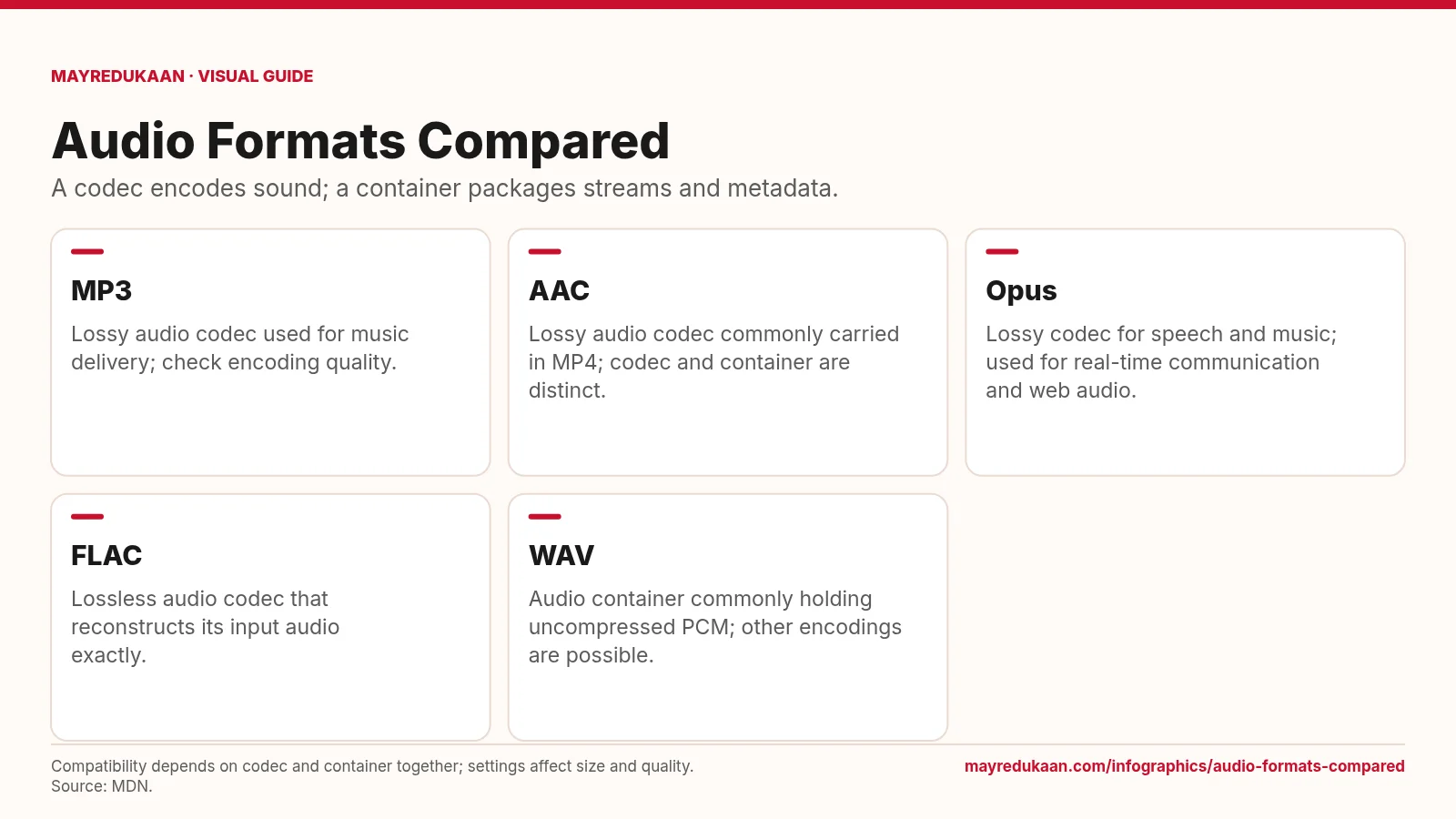
What the diagram shows
- MP3: Lossy audio codec used for music delivery; check encoding quality.
- AAC: Lossy audio codec commonly carried in MP4; codec and container are distinct.
- Opus: Lossy codec for speech and music; used for real-time communication and web audio.
- FLAC: Lossless audio codec that reconstructs its input audio exactly.
- WAV: Audio container commonly holding uncompressed PCM; other encodings are possible.
Compatibility depends on codec and container together; settings affect size and quality. Source: MDN.
Read MP3, AAC and Opus as lossy codecs
The first three cards identify lossy codecs rather than promising a quality ranking. MP3 is used for music distribution, AAC is commonly carried in MP4, and Opus supports speech and music applications, including real-time communication. Their actual results depend on encoding settings and the source material. MDN discusses bitrate as an important influence on file size and fidelity, so an extension is not a complete quality label. AAC's card also highlights the difference between encoding and packaging: MP4 is a container that can carry AAC audio, not another name for the AAC codec itself. [1](https://developer.mozilla.org/en-US/docs/Web/Media/Guides/Formats/Audio_codecs)
Distinguish lossless FLAC from the WAV container
The FLAC card promises exact reconstruction of the audio supplied to the encoder, because FLAC uses lossless compression. The WAV card makes a different statement: WAV is a container commonly used for uncompressed PCM, but it can contain other encoded audio. Calling every WAV file uncompressed would therefore confuse a common convention with a requirement. Uncompressed PCM represents sampled audio directly, while lossless compression can reduce the representation without changing the reconstructed input. Neither approach can restore information that a previous lossy encoding already discarded. Check the actual encoding when the distinction matters for editing, interchange or preservation. [1](https://developer.mozilla.org/en-US/docs/Web/Media/Guides/Formats/Containers) [2](https://developer.mozilla.org/en-US/docs/Web/Media/Guides/Formats/Audio_codecs)
Check the complete playback and editing workflow
The subtitle and footnote explain why a codec choice is only part of the decision. A container packages streams and metadata, and software support can depend on the particular combination of container and codec. Confirm that the receiving application can decode your chosen combination, not merely recognize the filename extension. For further mixing or recompression, MDN identifies lossless encoding as a way to avoid amplifying compression artifacts. For delivery, a lossy codec may better suit size and bandwidth constraints. Sample rate and bit depth describe other aspects of digital audio, so do not interpret them as substitutes for the codec or its compression behavior. [1](https://developer.mozilla.org/en-US/docs/Web/Media/Guides/Formats/Audio_codecs) [2](https://developer.mozilla.org/en-US/docs/Web/Media/Guides/Formats/Audio_concepts)
Key facts
- MP3, AAC and Opus are lossy audio codecs.
- FLAC uses lossless compression.
- WAV is a container rather than a single audio codec.
- WAV commonly carries uncompressed PCM but permits other encodings.
- A media container can package streams together with metadata.
Frequently asked questions
Is every WAV file uncompressed?
No; WAV commonly contains uncompressed PCM, but the container also supports other encodings.
Will MP3-to-WAV conversion restore lost sound?
No; storing decoded MP3 audio in WAV does not recover information discarded during MP3 encoding.
Is AAC the same thing as MP4?
No; AAC is an audio codec, while MP4 is a container that can carry AAC and other supported streams.
Sources
- MDN: Web audio codec guide — accessed 2026-11-17
- MDN: Media container formats — accessed 2026-11-17
- MDN: Digital audio concepts — accessed 2026-11-17
More visual guides
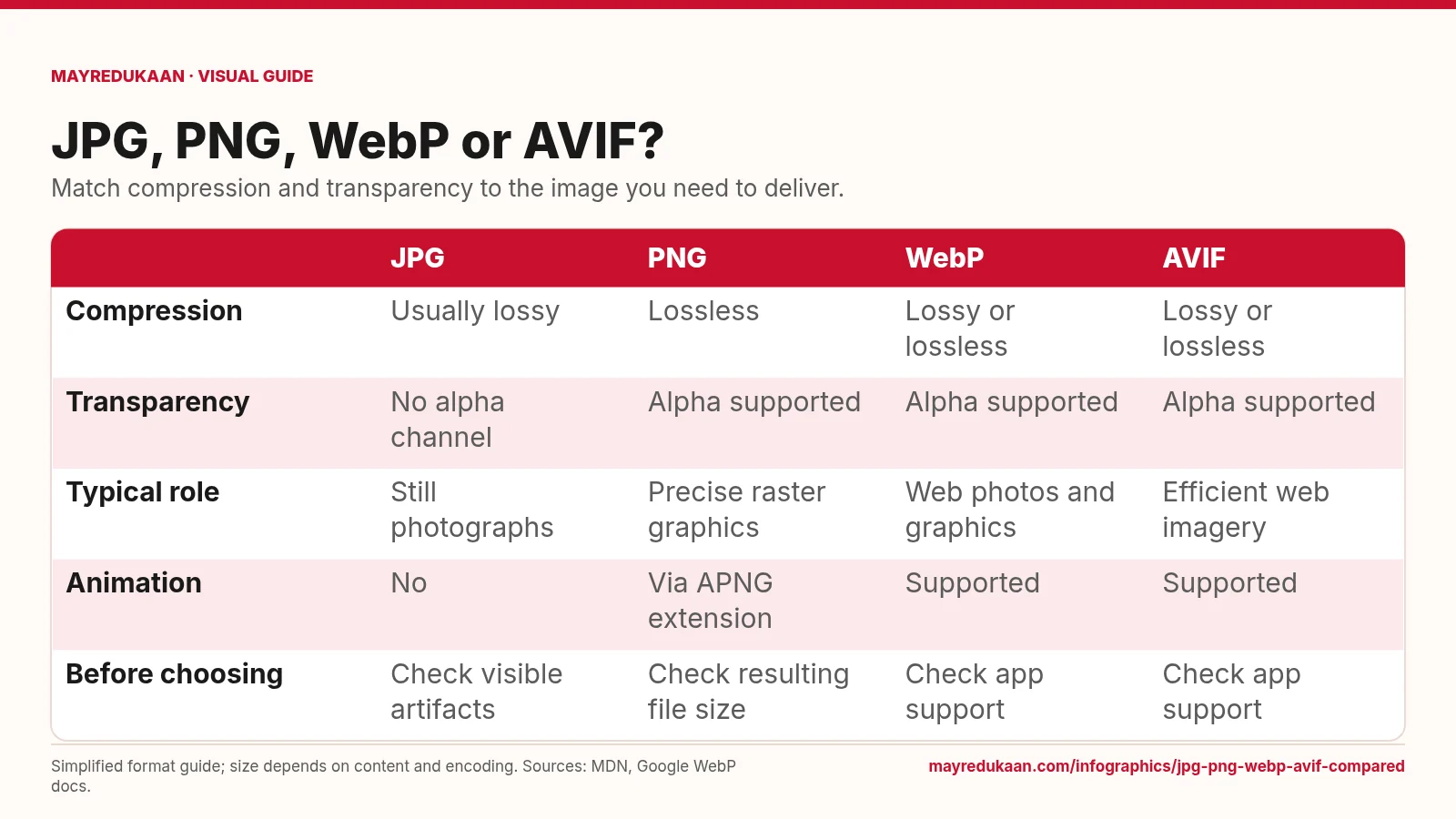
JPG, PNG, WebP and AVIF compared
Choose a format by the features your image needs, not by an assumed file-size ranking.
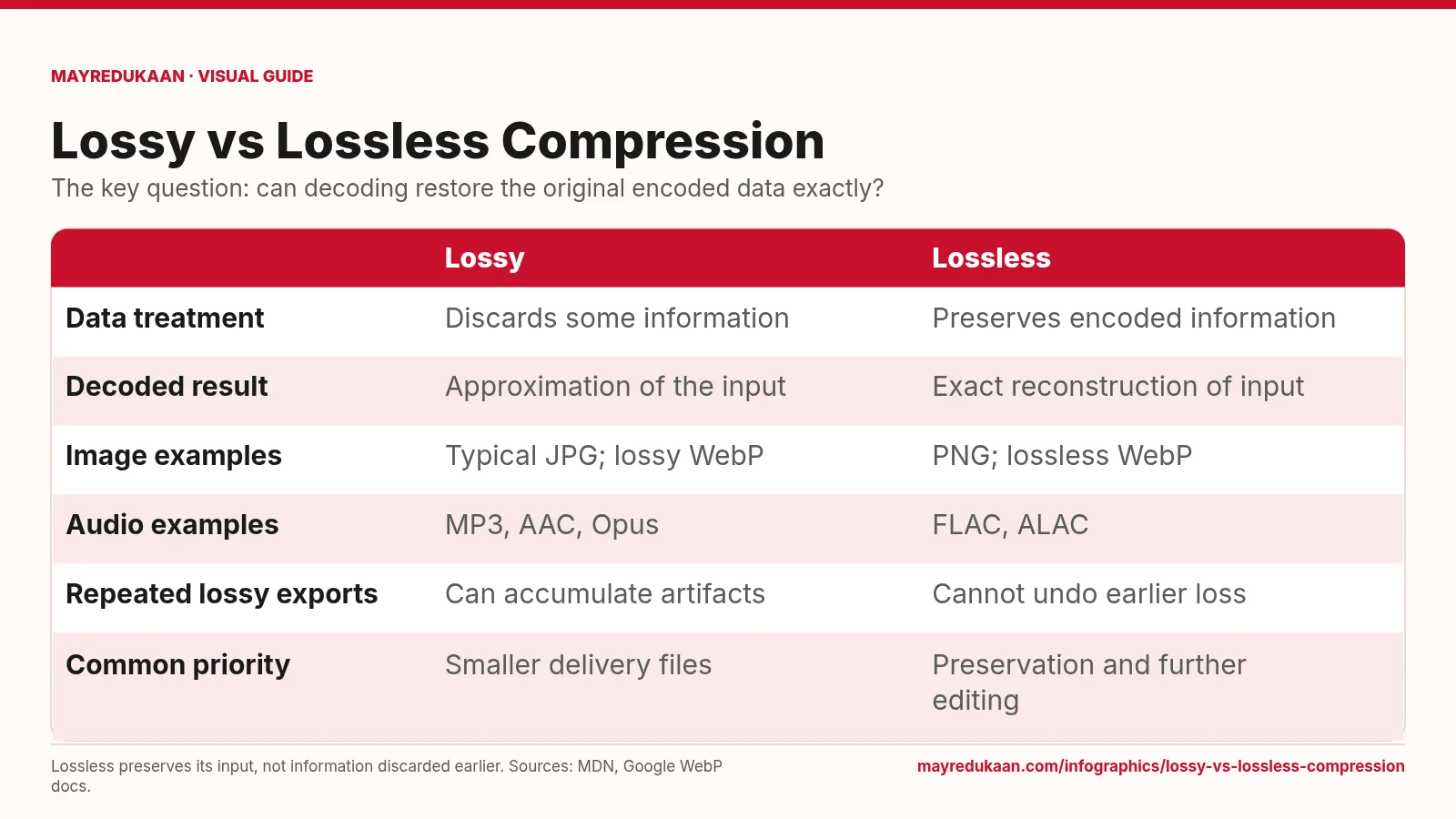
Lossy versus lossless compression
Lossless compression reconstructs its input exactly, but cannot repair information that was already discarded.
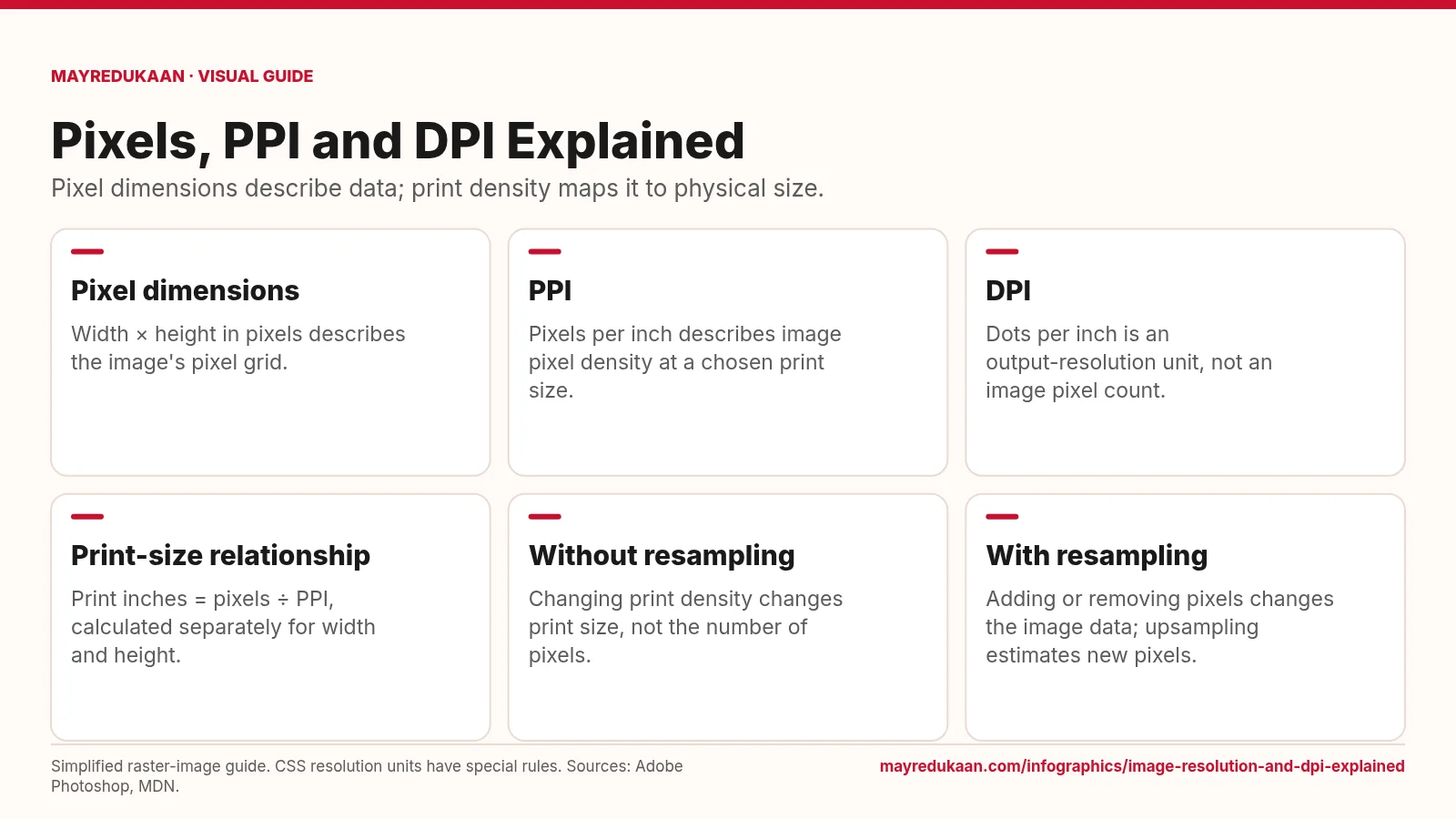
Image resolution and DPI explained
Changing a print-resolution setting is different from changing the image's pixel dimensions.