
Document formats explained
By MayreDukaan Research · Researched 2026-11-17
Document formats preserve different parts of a writing workflow. Some keep editable structure and formatting, some emphasize consistent presentation, and plain-text files leave document formatting behind. Microsoft's format guidance describes DOCX as XML-based, RTF as a way to exchange content and formatting, TXT as unformatted text, and PDF as an export that maintains its appearance across platforms. [1](https://support.microsoft.com/en-us/word/file-formats-for-saving-documents)
Compatibility still needs care. ODT works with Word and open-source applications such as LibreOffice, but individual features and formatting can change when moving between ODT and DOCX. The cards therefore describe useful roles, not a promise of perfect interchange. Keep an editable original when you need one, and inspect converted documents for the features that matter in your workflow. [2](https://support.microsoft.com/en-us/word/differences-between-the-opendocument-text-odt-format-and-the-word-docx-format)
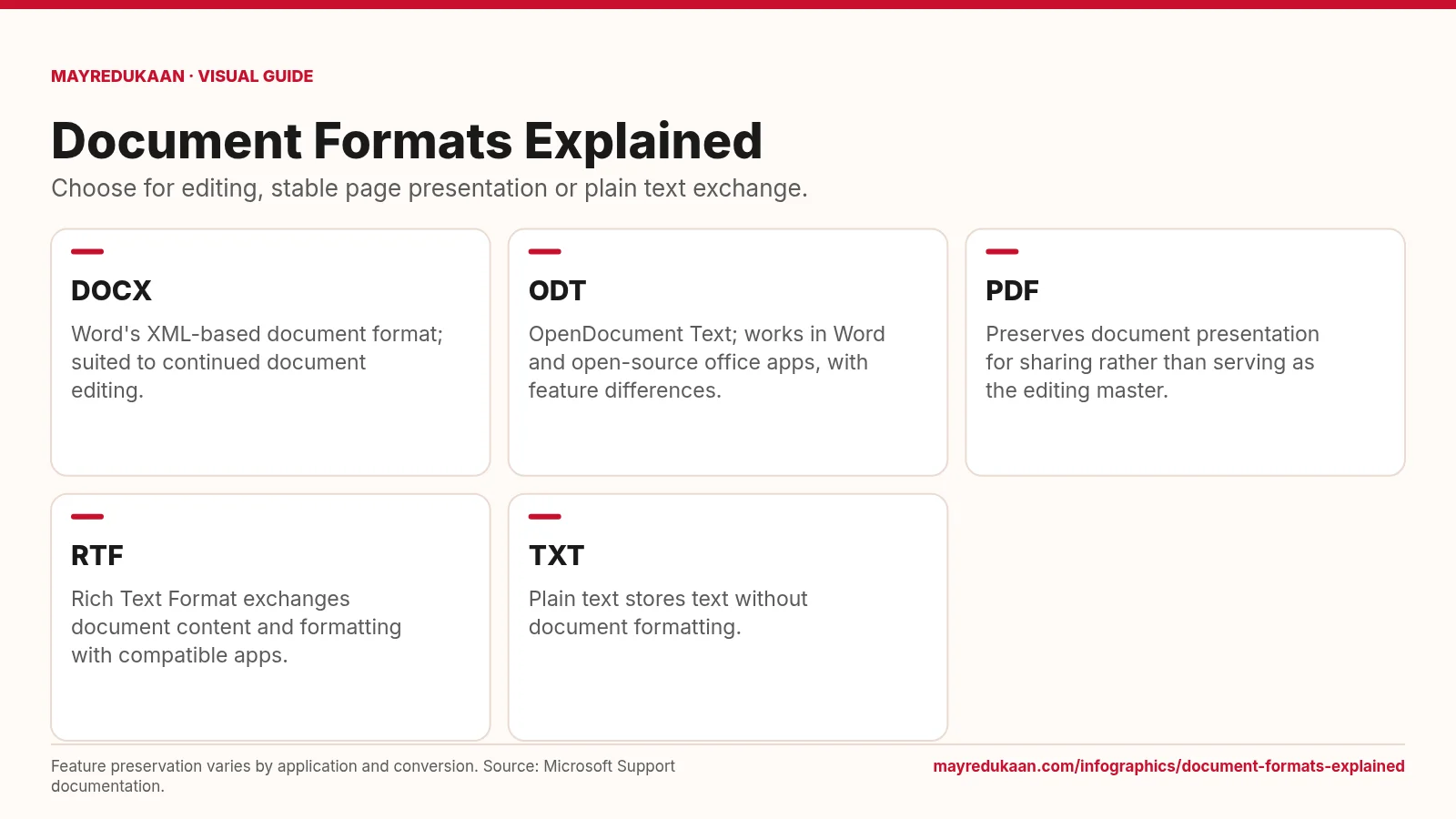
What the diagram shows
- DOCX: Word's XML-based document format; suited to continued document editing.
- ODT: OpenDocument Text; works in Word and open-source office apps, with feature differences.
- PDF: Preserves document presentation for sharing rather than serving as the editing master.
- RTF: Rich Text Format exchanges document content and formatting with compatible apps.
- TXT: Plain text stores text without document formatting.
Feature preservation varies by application and conversion. Source: Microsoft Support documentation.
Use DOCX and ODT with feature compatibility in mind
The first two cards describe formats used for editable documents. DOCX is Word's XML-based document format. ODT is OpenDocument Text and can be opened in Word as well as open-source office applications. That shared ability to open files does not guarantee that every feature survives conversion unchanged. Microsoft distinguishes supported, partially supported and unsupported Word features when saving to ODT. Partially supported features can change formatting or usability, while unsupported ones can lose content or functionality. If continued editing matters, choose the format supported by the receiving workflow and review the particular features your document actually uses. [1](https://support.microsoft.com/en-us/word/file-formats-for-saving-documents) [2](https://support.microsoft.com/en-us/word/differences-between-the-opendocument-text-odt-format-and-the-word-docx-format)
Separate presentation from the editing master
The PDF card focuses on presentation for sharing. Microsoft's format guide describes PDF export as producing a file that looks the same on Macintosh and Windows computers. That is a different priority from preserving every word-processing feature for subsequent editing. The card recommends using an editable source as the working master rather than treating the presentation copy as interchangeable with it. This is a workflow distinction, not a claim that PDF files are impossible to edit. Acrobat's own documentation describes PDFs containing images, fonts, forms and other objects, which explains why a PDF can be more than a static photograph of a page. [1](https://support.microsoft.com/en-us/word/file-formats-for-saving-documents) [2](https://helpx.adobe.com/acrobat/desktop/create-documents/optimize-pdfs/pdf-optimizer-settings.html)
Distinguish rich text from plain text
The last two cards contrast RTF and TXT. RTF, or Rich Text Format, exports document content and formatting in a form that compatible applications can interpret. TXT exports text without document formatting. That distinction matters when deciding whether the recipient needs styled content or only the words themselves. Neither card promises preservation of every advanced office-document feature, and the ODT comparison reinforces why file conversion should be checked rather than assumed to be exact. Read the converted result in its intended application, especially if layout or supported editing features matter. Select the simplest format that still preserves what the task requires. [1](https://support.microsoft.com/en-us/word/file-formats-for-saving-documents) [2](https://support.microsoft.com/en-us/word/differences-between-the-opendocument-text-odt-format-and-the-word-docx-format)
Key facts
- DOCX is an XML-based Word document format.
- ODT stands for OpenDocument Text.
- Word and open-source office applications can open ODT files.
- TXT exports document text without formatting.
- Some Word features are only partially supported or unsupported when saved to ODT.
Frequently asked questions
Does TXT preserve document formatting?
No; plain-text export saves text without document formatting.
Can Word open ODT?
Yes, but feature support and formatting can differ from DOCX.
What does RTF add compared with TXT?
RTF can carry document content and formatting for compatible applications, while TXT does not preserve document formatting.
Related free tools
Related comparisons
Sources
- Microsoft: File formats for saving documents — accessed 2026-11-17
- Microsoft: Differences between ODT and DOCX — accessed 2026-11-17
- Adobe: PDF optimizer settings — accessed 2026-11-17
More visual guides
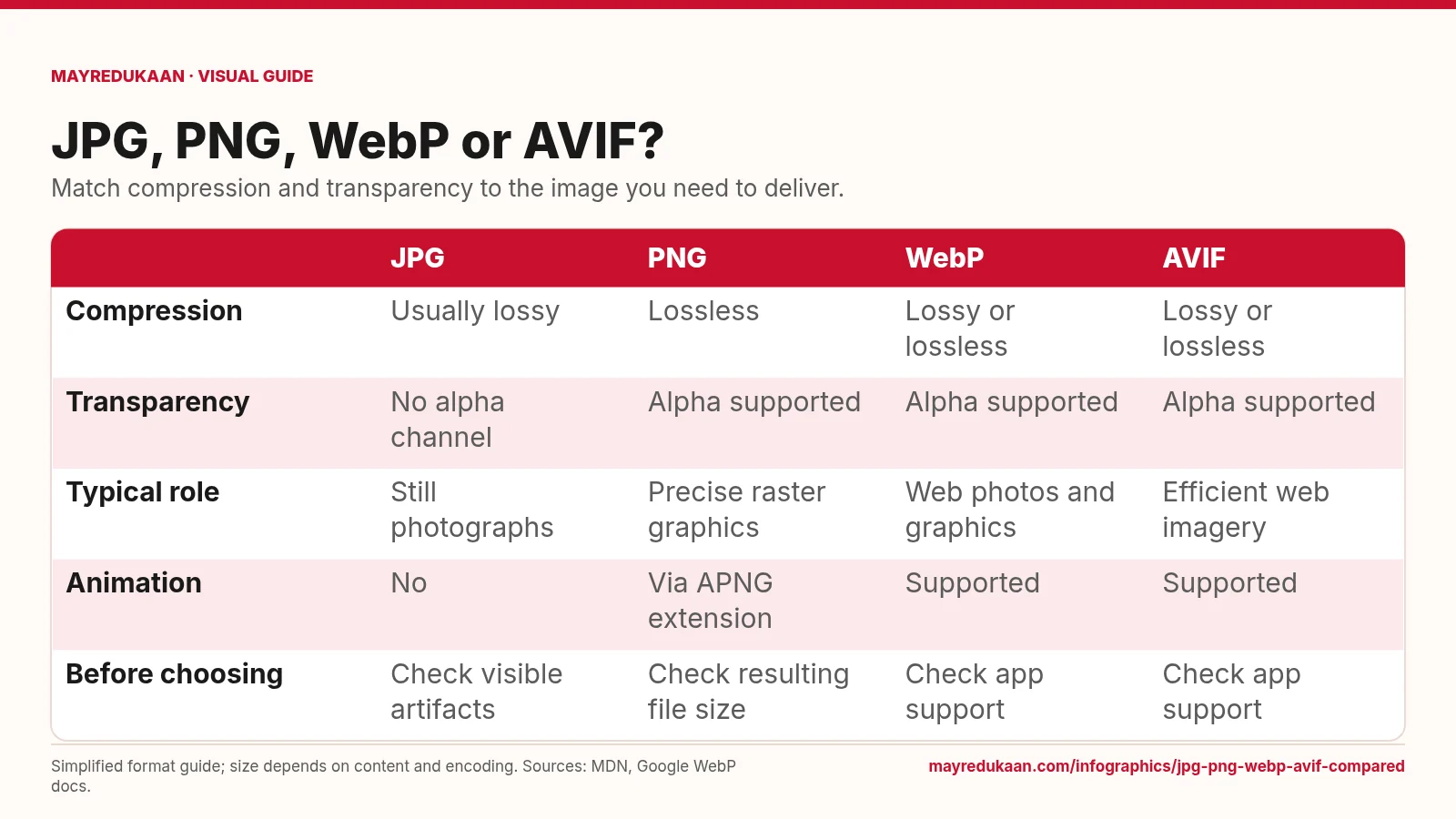
JPG, PNG, WebP and AVIF compared
Choose a format by the features your image needs, not by an assumed file-size ranking.
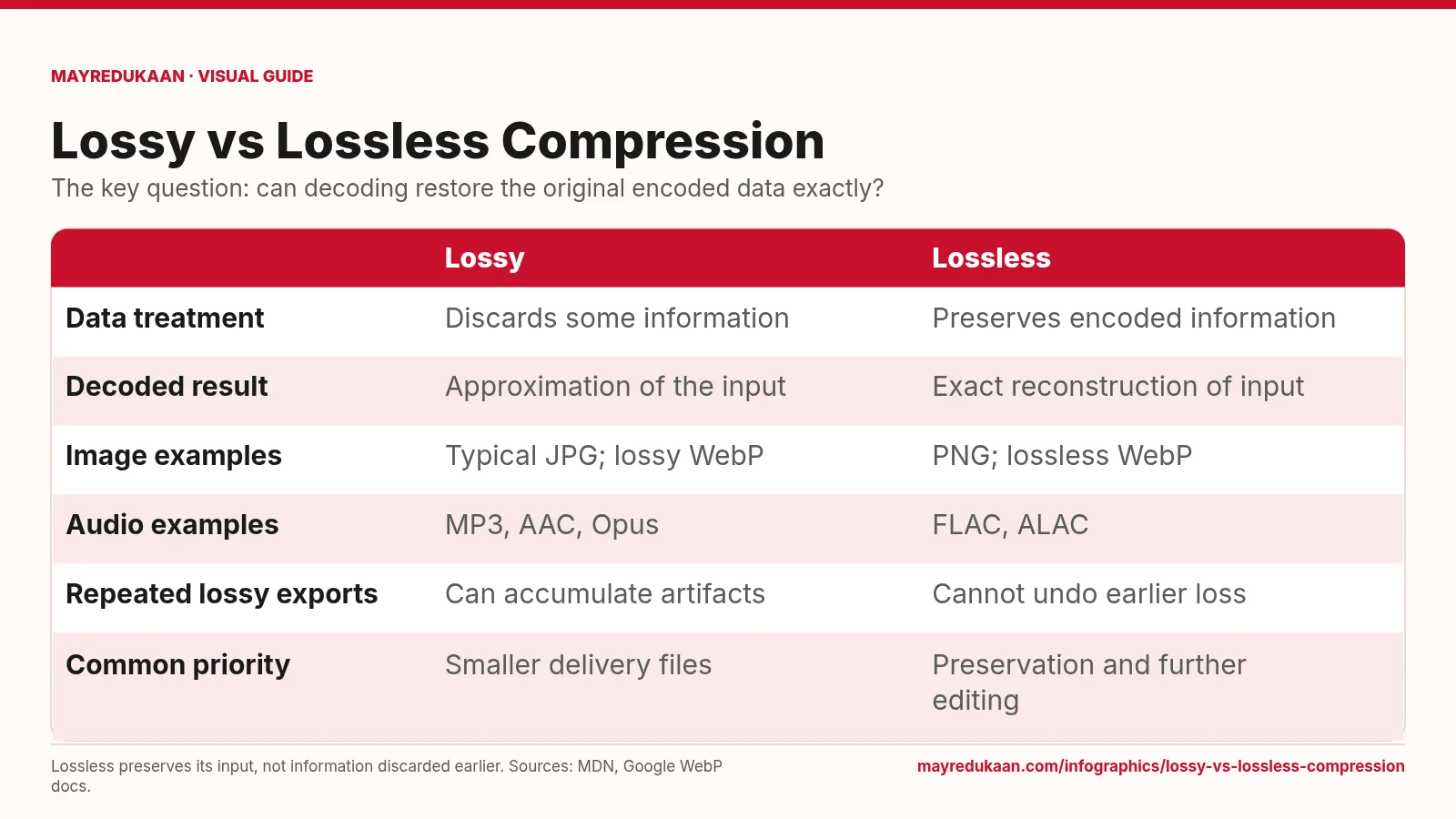
Lossy versus lossless compression
Lossless compression reconstructs its input exactly, but cannot repair information that was already discarded.
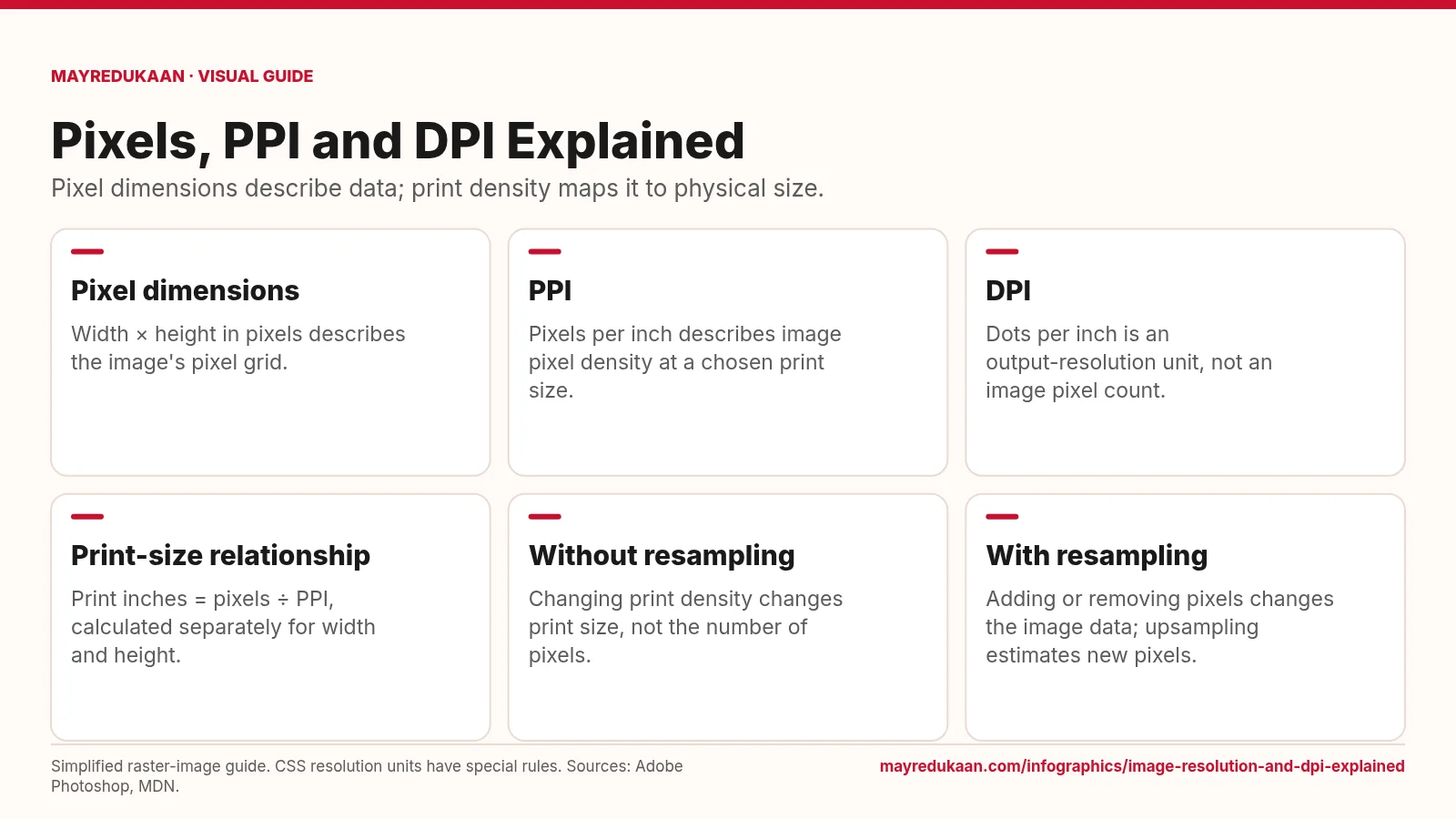
Image resolution and DPI explained
Changing a print-resolution setting is different from changing the image's pixel dimensions.